




When configuring an AI voice agent in Allo by Numericia, a lot of time is spent refining the prompt. This is normal. But there is an even more powerful lever, often underestimated: the quality of the documents you place in the knowledge base.
And in this area, the Markdown format changes everything.
Why the Markdown format makes your voice agents more efficient
An AI voice agent does not «read» a document the way you do. It analyzes it, segments it, vectorizes it, and mobilizes it in real-time during a call to formulate a relevant response. This process takes place in milliseconds. And the quality of this process depends directly on the structural readability of the source document.
A native PDF, a Word file, a scan: these formats contain noise. Unnecessary metadata, complex layouts, poorly encoded tables, parasitic characters. The AI must «guess» the hierarchy of the information before it can even use it.
Markdown, on the other hand, is a pure text format, structured and unambiguous. Headings are headings (# Heading). Lists are lists (- item). Tables are tables. The AI immediately understands the hierarchy, context, and relationships between pieces of information.
Concrete result: more accurate and faster responses, and smoother conversations. Less latency. Fewer hesitations. Fewer errors.
The rule is simple: the cleaner and more structured your source document, the more efficient your agent.
The problem: your documents are not in Markdown
Your technical manuals, product sheets, internal procedures, FAQs: they are likely in PDF, Word, or PowerPoint. Converting all of this manually to Markdown is a tedious task that no one wants to do.
This is where OpenL.
comes in.
OpenL: much more than a translation tool OpenL is known as an AI translation tool (100+ languages, text, images, documents, audio). But what interests us here is a discreet, free, and remarkably effective feature: the.
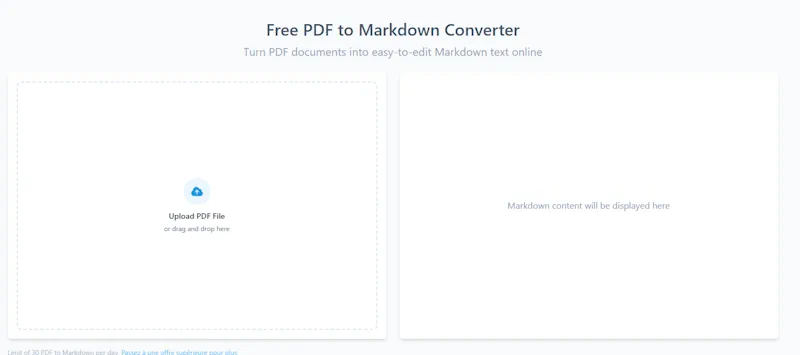
PDF → Markdown converter Accessible directly at, openl.io/pdf-to-markdown
- , this tool allows you to:
- Drop a PDF file
- Obtain a clean, structured, ready-to-use Markdown file in seconds
Download the result or copy it directly.
No account required. No installation. 30 free conversions per day.
The converter preserves headings, lists, paragraphs, and the logical structure of the document. This is exactly what an AI voice agent needs to work effectively.
The concrete workflow: from your PDF to your voice agent in 3 steps
Step 1 — Prepare your source document.
Gather the documents your agent needs to master: technical manual, after-sales service procedure, product sheet, warranty policy, internal FAQ. Ideally, use textual PDFs (not scans). If you have scans, OpenL also handles OCR in its paid plans.
Step 2 — Convert to Markdown with OpenL Accessible directly at. Go to . Drop your PDF. In seconds, you get a structured .md.
file. Quickly check the result: headings are properly hierarchical, lists are clean, tables are readable. If necessary, make some manual adjustments (a Markdown editor like Typora, Obsidian, or even VS Code is sufficient). Rename the file explicitly:, procedure-sav-produit-X.md, faq-garantie.md.
, etc.
Step 3 — Inject into the Allo knowledge base.
In your Allo by Numericia interface, add the Markdown file to your agent's knowledge base. The agent can now rely on it in real-time during calls. It cites the correct procedures, guides step-by-step, and responds with precision.
OpenL in detail: what you need to know
Business model and philosophy OpenL is an open-source project available on. GitHub.
. The code is public, the community is active. This guarantees a tool that evolves, will not disappear overnight, and whose operation you can audit if necessary. For those who value transparency and digital sovereignty, this is a significant point.
What the tool does (beyond PDF → Markdown)
- OpenL is first and foremost a multi-format AI translation platform. Here is what it covers:
- Translation of text, documents, images, audio, and video in 100+ languages
- Translation of Markdown files (useful if you have technical documents in English to translate for a French-speaking agent)
- Translation of PDF, DOCX, TXT, subtitles, images (PNG, JPG, SVG), MP3, MP4
Complementary tools: summarization, grammar correction, language detection, text-to-speech, speech-to-text, AI detection
- Free Pricing.
- Starter : 40 credits/day, 1,500 characters per translation, 30 PDF → Markdown conversions per day. No account required.
- Pro : €8.90/month (annual billing) — unlimited fast credits, up to 30,000 characters, files up to 30 MB.
- : €9.90/month (annual billing) — 1,000 advanced credits/month, up to 100,000 characters, files up to 100 MB, DeepThink and Smart Context included. : €24.90/month — unlimited advanced credits, up to 150,000 characters.
For «voice agent knowledge base» usage, the free plan largely covers the needs of an SME or a support team.
Confidentiality
OpenL does not store your documents after conversion. Data is deleted immediately after processing. History remains only in your local browser. For sensitive documents (internal procedures, customer data), this is an important point to verify according to your security policy.
Use case: when to use OpenL for your Allo knowledge base
After-sales service and technical support Do you have an 80-page maintenance manual in PDF? Convert it to Markdown. Your voice agent can now guide a technician or a customer step by step, citing the correct procedures, without improvising.
Multilingual hotline Is your documentation in French but you receive calls in English, Spanish, or German? Use OpenL to translate your Markdown documents into the target language, then inject both versions into the knowledge base. The agent detects the caller's language and relies on the correct document.
E-commerce and customer service Your product sheets, general terms and conditions of sale, return policies: convert them to Markdown and give your agent a solid document base to answer common questions without unnecessary escalation.
Operations teams and internal support Your internal procedures, runbooks, escalation guides: in Markdown within the knowledge base, your agent becomes a true Level 1 voice agent that filters, qualifies, and transfers intelligently.
Best practices for «agent-ready» Markdown documents»
A few simple rules to maximize your agent's performance:
- One document = one clear scope. Do not mix the return procedure and the technical manual in the same file. The agent performs better with targeted documents.
- Pay attention to headings. H1, H2, H3 headings are the AI's navigation landmarks. A well-titled document is a well-understood document.
- Avoid standalone images. If your PDF contains diagrams without textual captions, the agent cannot exploit them. Add textual descriptions.
- Update regularly. An agent that responds with an outdated procedure is worse than no agent. Schedule a monthly document review.
- Name your files explicitly.
faq-product-warranty-X.mdis infinitely more useful thandocument-final-v3.mdfor the AI's retrieval system.
In summary
OpenL is a free, open-source, easy-to-use tool that solves a concrete problem: transforming your existing documents (PDF, Word, etc.) into clean, structured Markdown, ready to be injected into the knowledge base of your Allo by Numericia voice agents.
This is not a gadget. It is an operational link in your support quality chain. A well-formatted document means an agent that responds better, faster, with fewer errors. And in a telephone support context, every second of latency and every imprecision costs customer satisfaction.
Take 10 minutes. Convert your first document. Test the difference.
Test Allo by Numericia (free & no commitment): numericia.fr
Note: OpenL is an independent third-party tool. Numericia is not affiliated with OpenL.